Virtual Desktop Indicator — always know which desktop you are on
Windows virtual desktops are handy, but checking which one you are on means pressing Win+Tab every time. This app removes that step by keeping the current desktop number and name on screen as a translucent overlay at all times. You can also jump to any desktop with a single hotkey.
Features
- An overlay that is always visible — shows
current / total desktop-nametranslucently at the top of the screen. By default clicks pass straight through, so it never blocks the window behind it. - Follows you everywhere — the overlay stays visible as you move between virtual desktops.
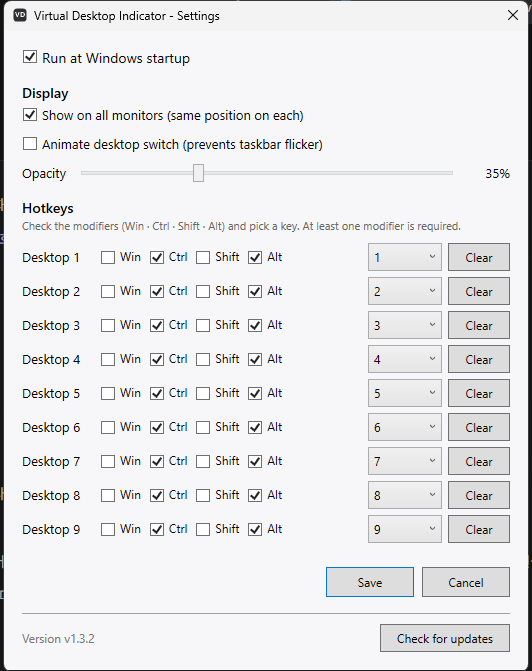
- Instant hotkey switching —
Ctrl+Alt+1throughCtrl+Alt+9jump straight to a desktop (defaults, and configurable). - Fully customizable — position, opacity, font size, colors and hotkeys can all be changed in the config file.
- One-click auto-update — checks GitHub Releases and installs new versions directly. The current version is shown in the tray menu and the settings window.
Installing
The Download button opens the GitHub releases page.
- Windows — download
VirtualDesktopIndicator-Setup-<version>.exeand run it; a setup wizard walks you through. - Linux (X11) — extract
VirtualDesktopIndicator-linux-x64-<version>.tar.gzand run./install.sh.
Worth knowing before you install:
- No separate .NET install is needed. It is a self-contained build with the runtime bundled, so nothing has to be installed on the target PC beforehand.
- No administrator rights are required. It installs only for the current user (under
%LocalAppData%). - During setup you can choose a desktop shortcut (optional) and Run at Windows startup (checked by default).
- Uninstall from Settings → Apps → Installed apps or the Start menu entry "Uninstall Virtual Desktop Indicator"; the autostart entry is cleaned up as well.
On Windows, if it is already installed the app checks for a newer version at startup.
Requirements
- Windows 10 / 11 (64-bit)
- On Linux, a separate build made with Avalonia UI targets X11 and uses the EWMH X11 protocol to detect and switch desktops.
FAQ
Q. Does the overlay get in the way? A. By default clicks pass through it, so you can use the window behind it normally. Position and opacity are adjustable too.
Q. The hotkeys clash with another program. A. You can change them in the config file.
Q. Do I need to install .NET? A. No. The build from the releases page includes the runtime.
Q. Is macOS supported? A. Currently only Windows and Linux (X11) are supported.