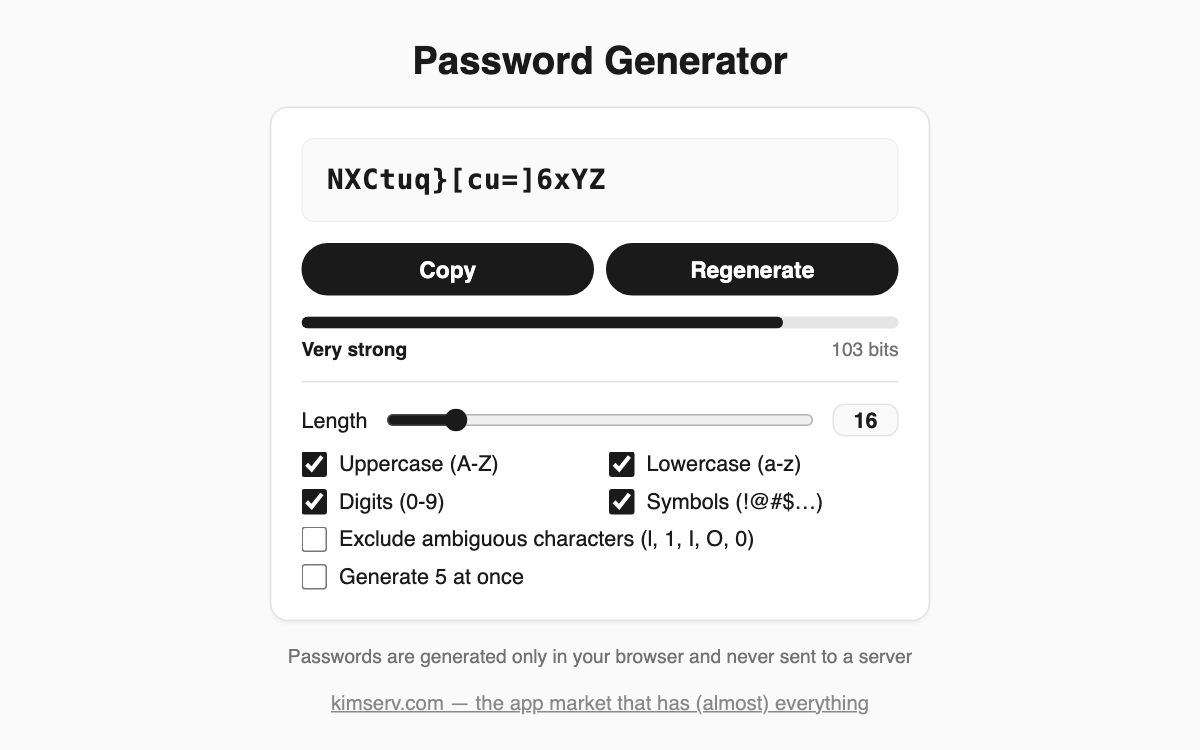
Password Generator — strong passwords made entirely in your browser
This tool builds strong passwords using your browser's cryptographic random generator (crypto). Nothing you configure is ever sent to a server, so every password is created and stays only on your device. It is handy whenever you sign up for a new account or need to rotate an old, weak password.
How to use
- Drag the length slider to pick anything from 8 to 64 characters.
- Tick the character types you want: uppercase, lowercase, digits, symbols.
- Optionally turn on the exclude-ambiguous-characters switch.
- Read the result and press Copy to send it to your clipboard.
- Press Regenerate if you want a fresh one.
Features & tips
- Each selected character type is guaranteed to appear at least once.
- The strength gauge reports entropy in bits so you can judge safety.
- Excluding look-alikes such as l, 1, I, O and 0 makes passwords easier to type by hand.
- The generate-5-at-once option lets you compare several candidates.
FAQ
Q. Is my password stored anywhere? A. No. It is generated only in browser memory, never sent or saved, and it disappears when you refresh.
Q. How many bits are enough? A. Anything above 80 bits shows as Strong, which is recommended for important accounts.
Q. What if a site rejects symbols? A. Turn off the symbols option and increase the length instead to keep good strength.