Meditation — follow your breath, rest in the sound
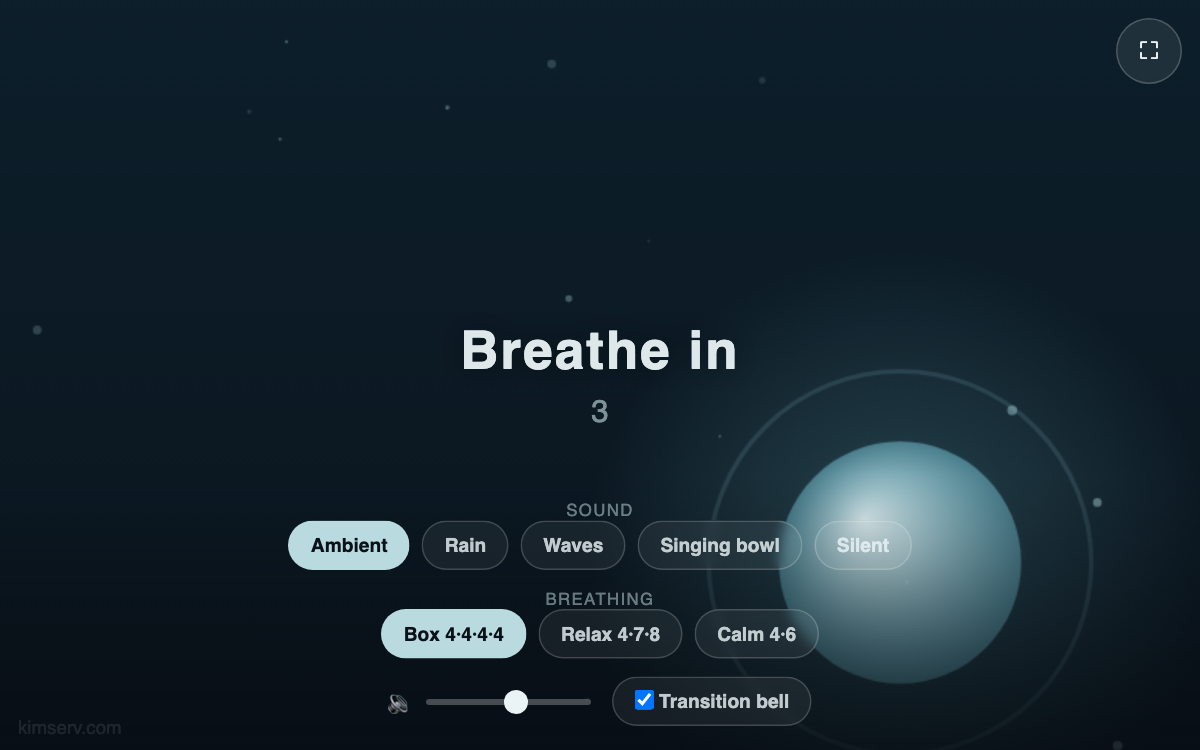
Breathe along with a soft orb of light that gently expands and contracts, and your mind naturally settles. Calming sounds — an ambient pad, rain, ocean waves, or a singing bowl — play continuously, while a soft bell guides each inhale and exhale. Perfect before sleep, when you need focus, or for a short break.
How to use
- Tap Begin to start (the first tap is needed so sound can play).
- Breathe in as the orb grows, breathe out as it shrinks, and pause during the hold phases.
- Choose a sound and a breathing pattern below, and adjust the volume.
- The controls fade away so you can immerse in the screen; move to bring them back.
Features & tips
- Three breathing patterns: Box 4-4-4-4, Relax 4-7-8, and Calm 4-6.
- Five soundscapes synthesized right in your browser: Ambient, Rain, Waves, Singing bowl, and Silent (no downloads).
- A gentle bell marks every inhale and exhale transition (can be turned off).
- Fullscreen mode and a dark screen deepen the sense of immersion.
FAQ
Q. I hear no sound. A. Browsers only allow audio after your first tap (Begin). Please also check your device volume and silent mode.
Q. Which breathing pattern should I pick? A. If you are new, Box breathing (4-4-4-4) is easy; for relaxation, try 4-7-8.
Q. Does it work offline? A. All sounds and animation are generated on your device, so it uses almost no data.