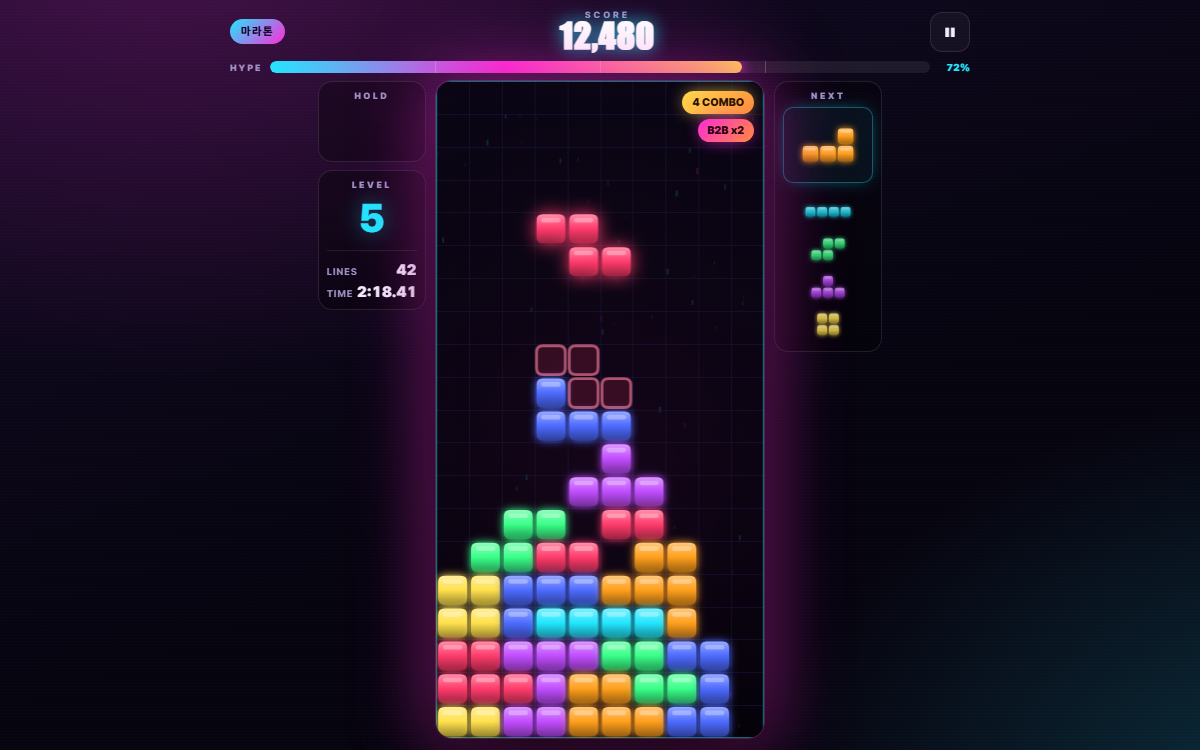
KETRIS — stack blocks under the neon lights
The familiar falling-block puzzle: rotate and slide the seven tetromino shapes, fill a row, and watch it vanish. What sets this one apart is the look and the noise around it — a neon cyber board, a HYPE meter that fills as you clear lines, and cheers that pop up on every big move. No install and no sign-up: open the link and play, with keyboard on desktop and touch on your phone. Note that the interface is written in Korean.
How to play
- Pick a mode on the title screen. Double-click a mode card or press Enter to jump straight in.
- Move the piece with the left and right arrow keys, and rotate with the up arrow or X to fit the gap.
- Press Space to slam the piece all the way down, and stash an awkward piece in hold with C.
- The NEXT panel on the right previews the next five pieces, so plan your spot before they arrive.
Four modes
- Marathon (마라톤) — the endless default. The level rises every 10 lines and the pieces keep falling faster.
- Sprint (스프린트) — race to clear 40 lines as fast as you can. Speed stops climbing at level 5.
- Ultra (울트라) — score as high as you can in two minutes, with the clock counting down.
- Daily (데일리) — the seed comes from the date, so everyone gets the same piece order that day. One record per day.
Scoring
- Clearing lines pays 100, 300, 500, and 800 for four at once (a KETRIS), all multiplied by your level.
- T-spin — twist a T piece into a gap and the payout jumps to between 400 and 1,600.
- Back-to-back — chain a four-line clear or a T-spin into another one for a 1.5× multiplier.
- Combo — keep clearing on consecutive pieces and each combo step adds more points.
- Perfect clear — empty the whole board for the biggest bonus, up to 2,000 times your level.
- A hard drop pays 2 points per cell and a soft drop 1, so hurrying actually pays.
Ranks and skins
Your score carries you up eight ranks: Newbie 🐣 → Bronze 🥉 → Silver 🥈 → Gold 🥇 → Platinum 💎 → Diamond 🔷 → Master 👑 → Legend 🔥. The bar on the title screen shows how many points are left until the next one. Four skins — NEON cyber, VAPOR, MATRIX hacker, and CANDY pastel — change the whole palette, and music and sound effects have separate volume sliders.
Controls
- Move with ← → or A D, soft drop with ↓ or S, hard drop with Space.
- Rotate clockwise with ↑, X, or W; counter-clockwise with Z or Ctrl; 180° with Q.
- Hold is C or Shift, pause is ESC or P, and R restarts the run.
- On mobile, drag the board sideways to move, tap to rotate, and flick down for a hard drop. On-screen buttons are there too.
Features & tips
- Wall kicks nudge a blocked rotation into place, so pieces still slot into tight gaps.
- A translucent ghost marks the landing spot, which makes hard drops safe to use freely.
- Leaving one column open and clearing four rows at once with an I piece is the most point-efficient way to play.
- Records are kept per mode in your browser, and the 결과 복사 button on the result screen copies your score to share.
FAQ
Q. Do I need to install anything or sign up? A. No. Open the link and it plays for free right in your browser.
Q. Are my records saved? A. Yes — best score per mode plus total plays and lines are stored in your browser. They are kept separately on each device and browser.
Q. Why is the piece order identical in Daily mode? A. The order is generated from the date, so everyone playing that day gets the same sequence and it comes down to pure skill.
Q. Does it work on a phone? A. Yes. The board scales to your screen and responds to drag, tap, and swipe, with on-screen buttons as well.
Q. Why doesn't Sprint get faster? A. Speed is capped at level 5 so that every 40-line run is timed under the same conditions.